
Desktop Versus Industrial Label Printers
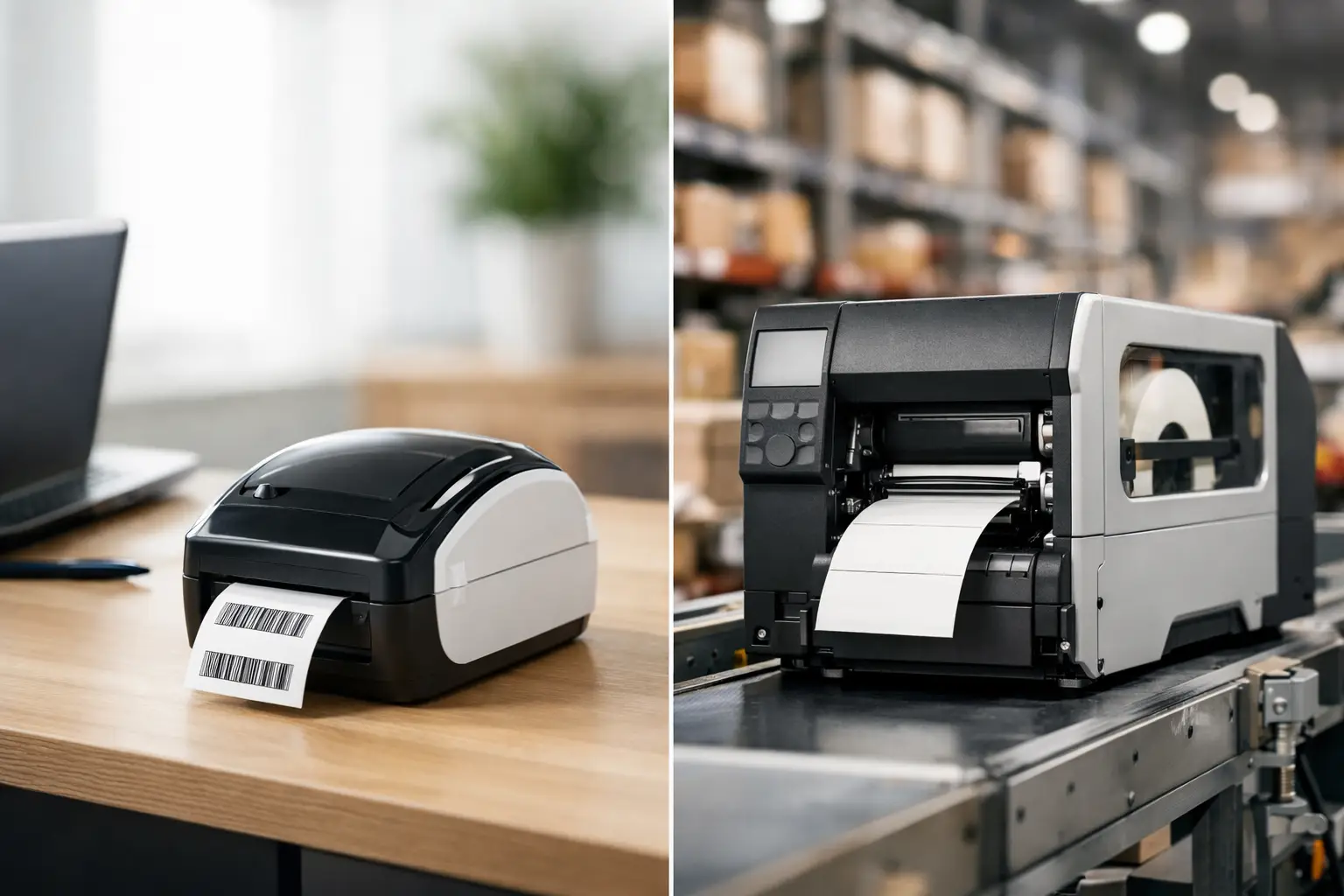
A printer that keeps up with receiving but stalls when shipping starts is not saving money. It is creating relabeling work, delayed orders, and frustrated operators. The decision between desktop versus industrial label printers should begin with the work the printer must perform during its busiest hour, not the purchase price on a quiet day.
Both printer types produce barcode, shipping, product, and identification labels. The difference is how consistently they handle volume, media, environmental conditions, and integration demands over time. For a small workstation, a desktop unit may be exactly right. For a production line, warehouse, or multi-shift operation, an industrial printer is often the more economical decision because it protects uptime.
Desktop versus industrial label printers: the practical difference
Desktop label printers are compact thermal printers designed for lower to moderate label volumes. They fit on a desk, receiving counter, packing station, or retail back-office workspace. Their smaller footprint and lower initial cost make them a practical choice when labels are printed in short runs throughout the day.
Industrial label printers are built for sustained operation. They typically have metal frames, higher-capacity media and ribbon handling, faster print engines, more connection options, and controls designed for warehouse or manufacturing use. They take up more space and cost more upfront, but they reduce the interruptions that become expensive when labeling is central to an operation.
The right choice depends on duty cycle, not simply label size. A business printing a few hundred shipping labels each day may be well served by a desktop printer. A facility printing the same quantity in concentrated bursts, using durable synthetic labels, or running multiple shifts may need industrial capacity.
Start with label volume and peak demand
Print volume is the first screening question. Desktop printers generally work well for low-volume and moderate-volume applications, particularly when operators can reload media without disrupting a critical process. They are common in offices, small stockrooms, clinics, retail environments, and individual packing stations.
Industrial printers are intended for heavier, continuous workloads. They are a better fit for high-throughput distribution, manufacturing work cells, asset identification programs, pallet labeling, and shipping departments where printers run for long periods. Their larger label and ribbon rolls mean fewer changeovers, which matters when an operator is processing hundreds of cartons or labeling parts at a production line.
Do not evaluate volume only by average labels per day. Look at peak periods. A warehouse may average 1,000 labels daily but print most of them in a two-hour outbound window. A desktop printer can become a bottleneck in that scenario even if its published daily capacity appears acceptable. Industrial equipment gives operations more margin when order volume rises, staffing changes, or a customer adds a new compliance requirement.
Consider the cost of a media change
Small media rolls are convenient in a low-volume setting. In a busy operation, they create repeated stops. Every roll or ribbon change introduces the possibility of loading the wrong material, misaligning the sensor, or restarting a print job incorrectly.
Industrial printers accept larger rolls and longer ribbons. That reduces hands-on maintenance and supports longer unattended runs. The savings are often measured in labor minutes rather than label cost, but those minutes add up quickly at shipping and production stations.
Print method and label durability matter
Both desktop and industrial models may use direct thermal or thermal transfer printing. The method should be selected based on the label’s expected life and exposure conditions.
Direct thermal printing uses heat-sensitive label stock and does not require a ribbon. It is efficient for short-life applications such as shipping labels, receipts, visitor badges, and temporary inventory labels. Heat, sunlight, abrasion, and time can cause direct thermal images to fade, so it is not the preferred choice for labels that must remain readable for months or years.
Thermal transfer printing uses a ribbon to place a durable image on the label surface. It is commonly used for product identification, UL-related applications, laboratory samples, asset tags, work-in-process labels, outdoor exposure, and chemical or industrial environments. The label material and ribbon must be matched to the application. A durable printer alone cannot make a paper label survive moisture, solvents, or abrasion.
Desktop thermal transfer printers can handle many durable-label applications, especially when runs are limited. Industrial thermal transfer printers are usually the stronger choice when using large ribbon rolls, wider labels, high print density, or demanding materials such as polyester and polypropylene. They are also better suited to operations that cannot pause production while a ribbon is replaced.
Evaluate the work environment, not just the printer specification
A clean office or climate-controlled packing desk is a reasonable setting for a desktop printer. Compact units are easy to place near the person who needs them and can provide excellent barcode quality when they are used within their intended duty cycle.
A production floor is different. Dust, vibration, forklift traffic, temperature variation, and constant handling place greater demands on equipment. Industrial printers are designed with heavier construction and serviceable components that support routine maintenance in tougher locations. They are generally easier to access for media loading and printhead replacement, which helps maintenance teams keep labeling systems running.
There is a middle ground. Some operations need a desktop printer at a remote station but use industrial printers at central shipping or production points. A mixed installation can be more effective than standardizing on one printer class everywhere. The key is to assign each device to work it can perform reliably.
Connectivity and system integration can decide the purchase
A label printer is part of a workflow, not a stand-alone appliance. Before selecting a model, confirm how labels will be designed, where data will originate, and who will manage printer settings.
Desktop printers often support USB and may offer Ethernet, Wi-Fi, Bluetooth, or serial connections depending on the model. That can be sufficient for a single computer, a mobile cart, or a small networked workstation. Industrial printers commonly offer broader standard connectivity and expansion options for enterprise networks, warehouse systems, scanners, applicators, and print-and-apply equipment.
Software is equally important. A label design platform should handle barcodes, variable data, database connections, serialized numbers, date calculations, compliance formats, and operator-friendly print screens. EasyLabel is designed to give businesses a proven platform for creating and printing labels without forcing every operator to become a programming specialist.
Before buying, verify the printer language, driver support, network requirements, and compatibility with your ERP, WMS, shipping software, or database. A lower-priced printer that requires workarounds, manual data entry, or repeated label redesigns can cost more than a properly integrated system.
Choose print resolution based on the data, not the marketing claim
Higher resolution is useful, but it is not automatically better for every job. Standard-resolution printers are well suited to many shipping labels, carton labels, warehouse locations, and common barcode formats. They often provide a good balance of speed and print quality.
Higher resolution becomes more valuable for small labels, dense 2D barcodes, tiny text, electronics identification, medical labeling, and graphics that must remain crisp at a small size. However, high-resolution printing can reduce speed and may require more careful selection of media and ribbon.
Test the actual label at the intended size. A barcode that looks clear on screen can fail verification if the print darkness, label material, ribbon, or resolution is wrong. The label must scan reliably in the real environment, whether that is a dock door, freezer, production line, or customer receiving department.
A lower purchase price is not always a lower operating cost
Desktop printers are usually less expensive to acquire, making them appropriate when demand is limited or the printer is supporting a noncritical task. They also use less counter space and may be easier for a small team to deploy.
Industrial printers require a greater initial investment, but their value becomes clearer as volume and consequences increase. Fewer media changes, faster output, more durable construction, and better support for demanding consumables can lower the cost per usable label over the life of the equipment. Most importantly, they reduce the risk that a labeling station becomes the reason shipments wait or production stops.
When comparing options, account for the full system: printer, label stock, ribbons, software, printhead maintenance, connectivity, operator training, and technical support. The Label Guy helps businesses source these components together, so the printer, media, and label design process are selected for the same application rather than treated as separate purchases.
Make the decision around the application
Choose a desktop label printer when printing is intermittent, space is limited, labels are relatively simple, and an occasional media change will not interrupt a critical process. It is often a strong fit for office labeling, low-volume fulfillment, receiving desks, and local inventory management.
Choose an industrial label printer when labels are essential to moving product, maintaining traceability, meeting customer requirements, or keeping a production line supplied. It is the better choice for sustained print runs, larger media rolls, durable identification labels, harsh environments, and operations where downtime carries a real cost.
The best printer is not necessarily the largest machine or the least expensive one. It is the one that prints the correct label, with the correct data and material, at the speed your operation requires when the workload is at its highest.